> For the complete documentation index, see [llms.txt](https://docs.openmind.com/llms.txt). Markdown versions of documentation pages are available by appending `.md` to page URLs; this page is available as [Markdown](https://docs.openmind.com/full-autonomy-guidelines/features/video-recording.md).
# Video Recording
Capture footage from your robots' cameras for later review.
Video Recording captures footage from your robots' cameras so you can review what they saw after the fact — useful for incident review, demos, auditing an autonomous run, or debugging something that only shows up in the field.
### In the portal
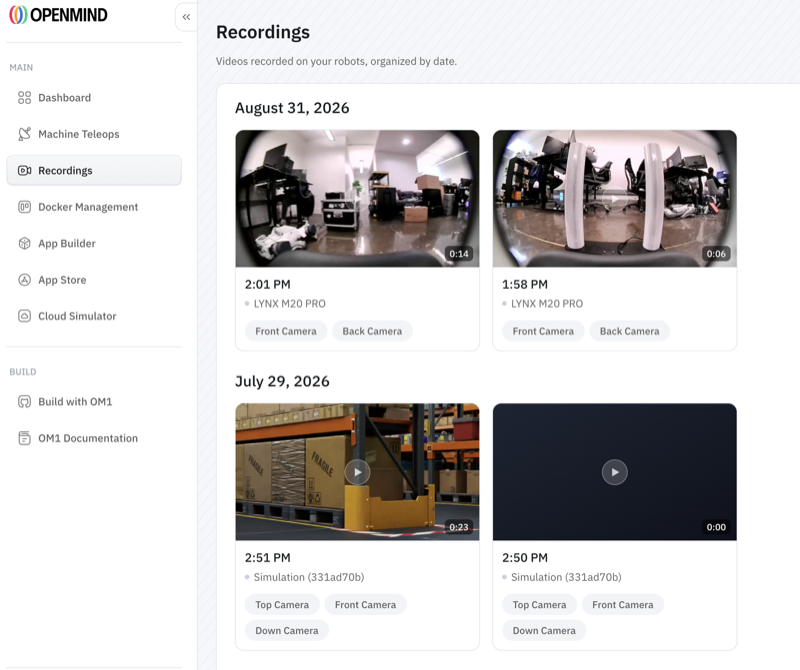
Recordings live under **Recordings** in the [OpenMind portal](https://portal.openmind.com) sidebar — *"videos recorded on your robots, organized by date."* They're grouped by day and you can filter by robot (or search), across your whole fleet.
Each recording captures the robot's **camera angles** — for example Top, Front, and Down cameras — and shows its length, the time it was taken, and which robot it came from. Click one to play it back in the browser. Both physical robots and [Cloud Simulator](/simulators/cloud-isaac-sim.md) sessions show up here.
To capture one, use the **Record** button on a robot's live view (Camera / Map view). When you stop, the clip appears under Recordings, organized by date.
 ### Notes
* Recording is a managed portal capability; availability and retention depend on your plan.
* For privacy-sensitive deployments, pair it with [Face Detection & Anonymization](/full-autonomy-guidelines/features/face-detection-anonymization.md).
### Related
* [Face Detection & Anonymization](/full-autonomy-guidelines/features/face-detection-anonymization.md)
* [Cloud Simulator](/simulators/cloud-isaac-sim.md)
* [Plans & Access](/full-autonomy-guidelines/premium_features.md)
---
# Agent Instructions
This documentation is published with GitBook. GitBook is the documentation platform designed so that both humans and AI agents can read, navigate, and reason over technical content effectively. Learn more at gitbook.com.
## Querying This Documentation
If you need additional information that is not directly available in this page, you can query the documentation dynamically by asking a question.
Perform an HTTP GET request on the current page URL with the `ask` query parameter, and the optional `goal` query parameter:
```
GET https://docs.openmind.com/full-autonomy-guidelines/features/video-recording.md?ask=&goal=
```
`ask` is the immediate question: it should be specific, self-contained, and written in natural language.
`goal` is optional and describes the broader end goal you are ultimately trying to accomplish on behalf of the user. GitBook uses it to tailor the answer towards what is most useful for that goal.
The response will contain a direct answer to the question and relevant excerpts and sources from the documentation.
Use this mechanism when the answer is not explicitly present in the current page, you need clarification or additional context, or you want to retrieve related documentation sections.
### Notes
* Recording is a managed portal capability; availability and retention depend on your plan.
* For privacy-sensitive deployments, pair it with [Face Detection & Anonymization](/full-autonomy-guidelines/features/face-detection-anonymization.md).
### Related
* [Face Detection & Anonymization](/full-autonomy-guidelines/features/face-detection-anonymization.md)
* [Cloud Simulator](/simulators/cloud-isaac-sim.md)
* [Plans & Access](/full-autonomy-guidelines/premium_features.md)
---
# Agent Instructions
This documentation is published with GitBook. GitBook is the documentation platform designed so that both humans and AI agents can read, navigate, and reason over technical content effectively. Learn more at gitbook.com.
## Querying This Documentation
If you need additional information that is not directly available in this page, you can query the documentation dynamically by asking a question.
Perform an HTTP GET request on the current page URL with the `ask` query parameter, and the optional `goal` query parameter:
```
GET https://docs.openmind.com/full-autonomy-guidelines/features/video-recording.md?ask=&goal=
```
`ask` is the immediate question: it should be specific, self-contained, and written in natural language.
`goal` is optional and describes the broader end goal you are ultimately trying to accomplish on behalf of the user. GitBook uses it to tailor the answer towards what is most useful for that goal.
The response will contain a direct answer to the question and relevant excerpts and sources from the documentation.
Use this mechanism when the answer is not explicitly present in the current page, you need clarification or additional context, or you want to retrieve related documentation sections.