> For the complete documentation index, see [llms.txt](https://docs.openmind.com/llms.txt). Markdown versions of documentation pages are available by appending `.md` to page URLs; this page is available as [Markdown](https://docs.openmind.com/full-autonomy-guidelines/features/relocalization.md).
# Relocalization
Check whether the robot's pose can be trusted, and recover it from the dock.
Navigation is only as good as the robot's belief about where it is. When that belief drifts — or is lost outright after a restart — the robot needs to **relocalize**: re-establish a trustworthy pose in the map before it moves again.
### In the portal
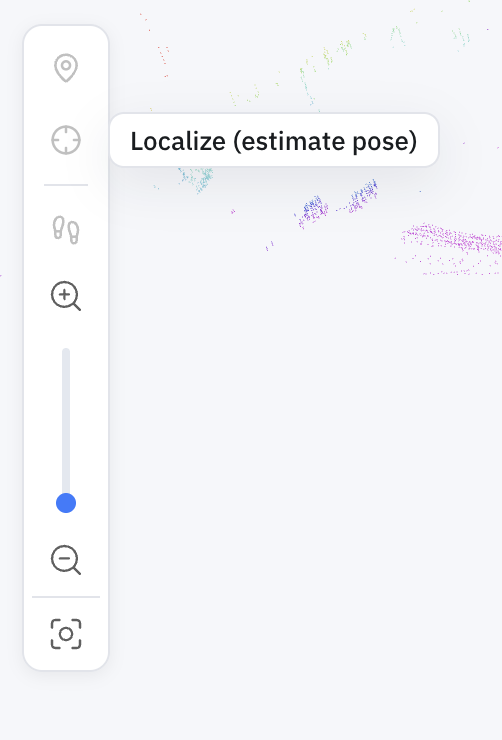
In the [Machine Teleops](/full-autonomy-guidelines/features/machine-teleops.md#map-view) **Map view**, the **Localize** tool fixes the pose by hand — reach for it when the robot has drifted or comes up unsure of where it is. Click **Localize (estimate pose)**, then set the robot's position and heading on the map.
 Over the API, two endpoints cover it: one to check the pose, one to fix it from the dock.
### Checking the pose
```bash
curl http://:5000/localization/status
```
This reports whether the current pose estimate can be trusted. On the 2D stack, [the navigation stack's AMCL variance](/full-autonomy-guidelines/api_endpoints.md#live-monitoring-navigation-api-5001) (`/api/amcl_variance` on `:5001`) is the finer-grained signal; on the 3D stack, the pose comes from ICP matching against the point cloud.
### Re-seeding from the dock
The charging station is the one pose the robot knows without estimating it — the saved charger location is a fact, not a guess. So relocalization re-seeds the pose **from the dock**:
```bash
curl -X POST http://:5000/localization/reseed -H 'Content-Type: application/json' -d '{}'
```
This is only valid **while the robot is charging** — that's what makes the dock pose reliable. It's also the **3D stack's only relocalization channel**: unlike 2D AMCL, 3D ICP localization can't recover on its own, so a robot whose 3D pose has drifted is brought back by docking and re-seeding.
This is why [deploying a patrol](/full-autonomy-guidelines/features/patrol.md#deploying-a-patrol) sends the robot home before restarting navigation — the restart discards the pose estimate, and the dock is where it's re-established. In the portal you'll see this as the **"Seeding localization from the charging station"** step of a deploy.
### Parameters
`POST /localization/reseed`
| Parameter | Type | Required | Description |
| ---------- | ------ | -------- | --------------------------------------------------------------- |
| `map_name` | string | no | Map whose charger pose to seed from; defaults to the active map |
| `map_dir` | string | no | Explicit map directory, if you're not using the active map |
### If something goes wrong
* **`400` "must be on the charging station"** — the robot isn't charging. Dock it first ([Auto Charging](/full-autonomy-guidelines/features/auto-charging.md)), then re-seed.
* **`400` on seed** — the charger pose couldn't be resolved for the map; confirm a [charger location](/full-autonomy-guidelines/features/auto-charging.md#telling-the-robot-where-the-dock-is) is saved.
For system endpoints like `GET /status` and base control, see the [Autonomy API Overview](/full-autonomy-guidelines/api_endpoints.md).
---
# Agent Instructions
This documentation is published with GitBook. GitBook is the documentation platform designed so that both humans and AI agents can read, navigate, and reason over technical content effectively. Learn more at gitbook.com.
## Querying This Documentation
If you need additional information that is not directly available in this page, you can query the documentation by asking a question.
Perform an HTTP GET request on the following URL with the `ask` and `goal` query parameters:
```
GET https://docs.openmind.com/full-autonomy-guidelines/features/relocalization.md?ask=&goal=
```
`ask` is the immediate question: it should be specific, self-contained, and written in natural language.
`goal` is what the user is ultimately trying to achieve, the reason they need the answer. Sharing it helps GitBook give you a better, more relevant answer. A goal is most helpful when it describes the outcome the user wants rather than restating the question. For example, with `ask=how do I create an API token`, a goal like `automate deployments from our CI pipeline` lets GitBook tailor the answer to that use case.
The response will contain a direct answer to the question and relevant excerpts and sources from the documentation.
Use this mechanism when the answer is not explicitly present in the current page, you need clarification or additional context, or you want to retrieve related documentation sections.
Over the API, two endpoints cover it: one to check the pose, one to fix it from the dock.
### Checking the pose
```bash
curl http://:5000/localization/status
```
This reports whether the current pose estimate can be trusted. On the 2D stack, [the navigation stack's AMCL variance](/full-autonomy-guidelines/api_endpoints.md#live-monitoring-navigation-api-5001) (`/api/amcl_variance` on `:5001`) is the finer-grained signal; on the 3D stack, the pose comes from ICP matching against the point cloud.
### Re-seeding from the dock
The charging station is the one pose the robot knows without estimating it — the saved charger location is a fact, not a guess. So relocalization re-seeds the pose **from the dock**:
```bash
curl -X POST http://:5000/localization/reseed -H 'Content-Type: application/json' -d '{}'
```
This is only valid **while the robot is charging** — that's what makes the dock pose reliable. It's also the **3D stack's only relocalization channel**: unlike 2D AMCL, 3D ICP localization can't recover on its own, so a robot whose 3D pose has drifted is brought back by docking and re-seeding.
This is why [deploying a patrol](/full-autonomy-guidelines/features/patrol.md#deploying-a-patrol) sends the robot home before restarting navigation — the restart discards the pose estimate, and the dock is where it's re-established. In the portal you'll see this as the **"Seeding localization from the charging station"** step of a deploy.
### Parameters
`POST /localization/reseed`
| Parameter | Type | Required | Description |
| ---------- | ------ | -------- | --------------------------------------------------------------- |
| `map_name` | string | no | Map whose charger pose to seed from; defaults to the active map |
| `map_dir` | string | no | Explicit map directory, if you're not using the active map |
### If something goes wrong
* **`400` "must be on the charging station"** — the robot isn't charging. Dock it first ([Auto Charging](/full-autonomy-guidelines/features/auto-charging.md)), then re-seed.
* **`400` on seed** — the charger pose couldn't be resolved for the map; confirm a [charger location](/full-autonomy-guidelines/features/auto-charging.md#telling-the-robot-where-the-dock-is) is saved.
For system endpoints like `GET /status` and base control, see the [Autonomy API Overview](/full-autonomy-guidelines/api_endpoints.md).
---
# Agent Instructions
This documentation is published with GitBook. GitBook is the documentation platform designed so that both humans and AI agents can read, navigate, and reason over technical content effectively. Learn more at gitbook.com.
## Querying This Documentation
If you need additional information that is not directly available in this page, you can query the documentation by asking a question.
Perform an HTTP GET request on the following URL with the `ask` and `goal` query parameters:
```
GET https://docs.openmind.com/full-autonomy-guidelines/features/relocalization.md?ask=&goal=
```
`ask` is the immediate question: it should be specific, self-contained, and written in natural language.
`goal` is what the user is ultimately trying to achieve, the reason they need the answer. Sharing it helps GitBook give you a better, more relevant answer. A goal is most helpful when it describes the outcome the user wants rather than restating the question. For example, with `ask=how do I create an API token`, a goal like `automate deployments from our CI pipeline` lets GitBook tailor the answer to that use case.
The response will contain a direct answer to the question and relevant excerpts and sources from the documentation.
Use this mechanism when the answer is not explicitly present in the current page, you need clarification or additional context, or you want to retrieve related documentation sections.