> For the complete documentation index, see [llms.txt](https://docs.openmind.com/llms.txt). Markdown versions of documentation pages are available by appending `.md` to page URLs; this page is available as [Markdown](https://docs.openmind.com/full-autonomy-guidelines/features/patrol.md).
# Patrol
Run an autonomous patrol between waypoints along a route graph.
Patrol turns navigation into a routine: the robot loops between the waypoints of a [route graph](/full-autonomy-guidelines/features/maps-routes-locations.md), over and over, without anyone driving it. It's the backbone of monitoring and inspection deployments. If you've set up [auto-charging](/full-autonomy-guidelines/features/auto-charging.md), a patrol becomes genuinely hands-off — when the battery runs low the robot docks, tops up, and picks the route back up where it left off.
Patrol is supported on the **Unitree Go2** and the **Deep Robotics M20 Pro**, and it runs on top of navigation — so navigation needs to be up on the map first, with a route graph saved for it.
### In the portal
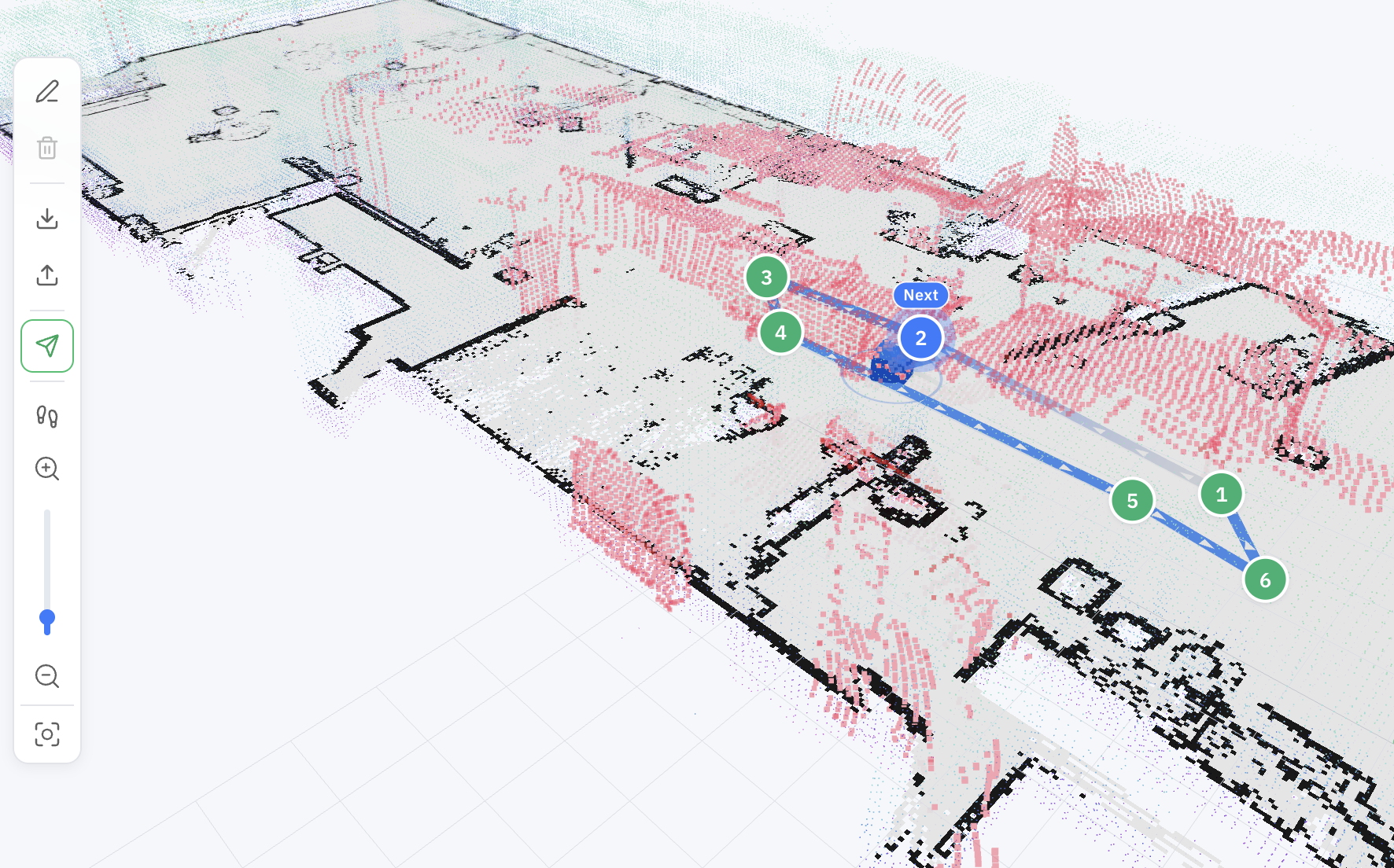
You can lay out a patrol route and start it from the [OpenMind portal](https://portal.openmind.com): in **Machine Teleops → Route Planner**, draw the waypoints on the map, save the route, and start the patrol — then pause, resume, or stop it from the same view. You can also set it to run **continuously** or on a **schedule** rather than starting each run by hand.
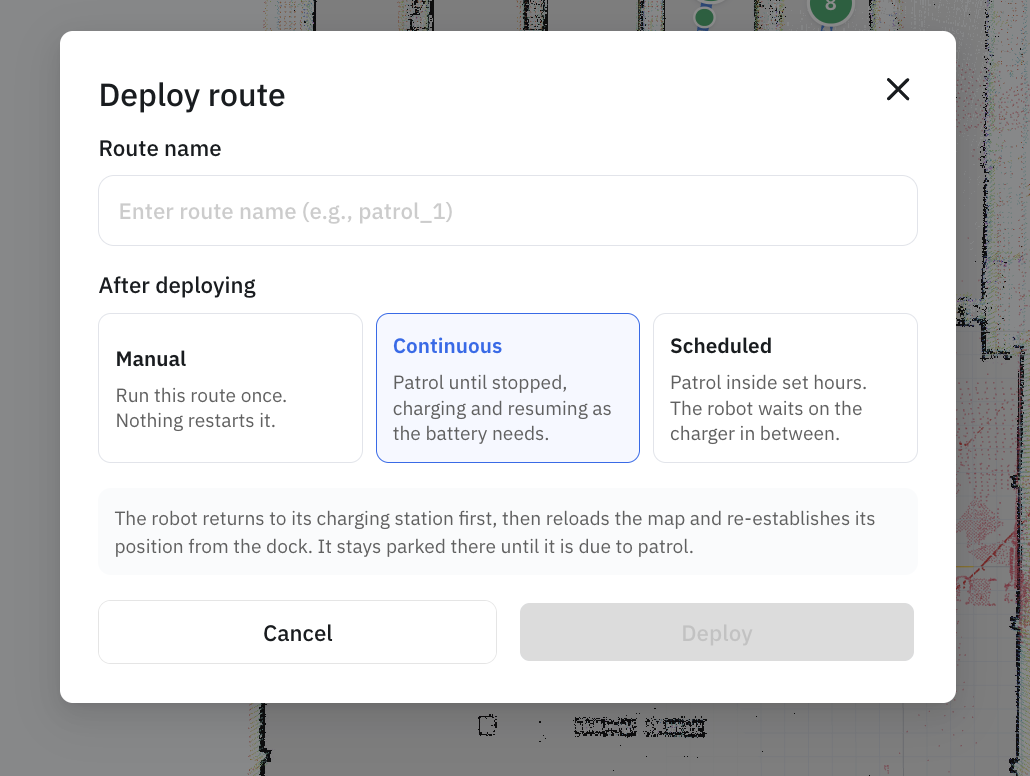
When you deploy a route, you choose how it should run — **Manual**, **Continuous**, or **Scheduled**:

When you deploy a route, you choose how it should run — **Manual**, **Continuous**, or **Scheduled**:
 *The Route Planner needs a saved map selected under Navigation Mode before it will open — if it reads "Please select a map from Settings to start planning," finish mapping and navigation setup first.*
### Running a patrol
Start it with the map and route:
```bash
curl -X POST http://:5000/start/patrol \
-H 'Content-Type: application/json' \
-d '{"map_name": "office", "route_name": "patrol_route_1"}'
```
Pause and resume as needed:
```bash
curl -X POST http://:5000/pause/patrol -H 'Content-Type: application/json' -d '{}'
curl -X POST http://:5000/resume/patrol -H 'Content-Type: application/json' -d '{}'
```
And stop when you're done:
```bash
curl -X POST http://:5000/stop/patrol -H 'Content-Type: application/json' -d '{}'
```
`GET /status` tells you what's running at any time — look at `patrol_status` and `current_patrol` (which map and route are loaded). Note the endpoint pattern is `/patrol` (`start`, `stop`, `pause`, `resume`), not `patrol/`.
### Scheduling patrols
A patrol supervisor decides *when* patrols run. It has three modes, set with `POST /patrol/mode`:
* **`manual`** — patrols run only when you start them (the commands above).
* **`continuous`** — the robot patrols the given map + route on a loop, indefinitely.
* **`scheduled`** — the robot patrols only inside the recurring time windows you define.
```bash
curl -X POST http://:5000/patrol/mode \
-H 'Content-Type: application/json' \
-d '{"mode": "scheduled"}'
```
`GET /patrol/supervisor` reports the current mode, phase, and configured schedules; `GET /status` also surfaces `patrol_mode`, `patrol_phase`, `patrol_next_map_name`, `patrol_next_route_name`, `patrol_next_run_at`, and `patrol_last_skip_reason`.
#### Schedules
A schedule is a **recurring weekday-and-time window** (not a cron expression). Each one names a map and route, the days it runs, and a daily start/end time in a timezone:
```bash
curl -X POST http://:5000/patrol/schedules \
-H 'Content-Type: application/json' \
-d '{
"schedule_id": "weekday_mornings",
"name": "Weekday mornings",
"map_name": "office",
"route_name": "patrol_route_1",
"days_of_week": [0, 1, 2, 3, 4],
"start_time": "08:00",
"end_time": "11:30",
"timezone": "America/New_York"
}'
```
| Field | Type | Required | Description |
| -------------- | ------ | -------- | --------------------------------------------------------------------- |
| `schedule_id` | string | yes | Stable id — posting the same id updates that schedule |
| `name` | string | no | Label shown in the UI |
| `enabled` | bool | no | Defaults to `true`; set `false` to keep a schedule without running it |
| `map_name` | string | yes | Map to patrol |
| `route_name` | string | yes | Route graph to follow |
| `days_of_week` | int\[] | yes | `0`=Monday … `6`=Sunday; must be non-empty |
| `start_time` | string | yes | `"HH:MM"`, local wall-clock |
| `end_time` | string | yes | `"HH:MM"`, must be **after** `start_time` |
| `timezone` | string | no | IANA name (e.g. `America/New_York`); defaults to `UTC`, DST-aware |
In the portal, this is the **Scheduled** option on the deploy dialog: pick the days, set a **From**/**To** time, choose the timezone (including "the robot's own clock"), and **Add a time window** for more than one block per day.
*The Route Planner needs a saved map selected under Navigation Mode before it will open — if it reads "Please select a map from Settings to start planning," finish mapping and navigation setup first.*
### Running a patrol
Start it with the map and route:
```bash
curl -X POST http://:5000/start/patrol \
-H 'Content-Type: application/json' \
-d '{"map_name": "office", "route_name": "patrol_route_1"}'
```
Pause and resume as needed:
```bash
curl -X POST http://:5000/pause/patrol -H 'Content-Type: application/json' -d '{}'
curl -X POST http://:5000/resume/patrol -H 'Content-Type: application/json' -d '{}'
```
And stop when you're done:
```bash
curl -X POST http://:5000/stop/patrol -H 'Content-Type: application/json' -d '{}'
```
`GET /status` tells you what's running at any time — look at `patrol_status` and `current_patrol` (which map and route are loaded). Note the endpoint pattern is `/patrol` (`start`, `stop`, `pause`, `resume`), not `patrol/`.
### Scheduling patrols
A patrol supervisor decides *when* patrols run. It has three modes, set with `POST /patrol/mode`:
* **`manual`** — patrols run only when you start them (the commands above).
* **`continuous`** — the robot patrols the given map + route on a loop, indefinitely.
* **`scheduled`** — the robot patrols only inside the recurring time windows you define.
```bash
curl -X POST http://:5000/patrol/mode \
-H 'Content-Type: application/json' \
-d '{"mode": "scheduled"}'
```
`GET /patrol/supervisor` reports the current mode, phase, and configured schedules; `GET /status` also surfaces `patrol_mode`, `patrol_phase`, `patrol_next_map_name`, `patrol_next_route_name`, `patrol_next_run_at`, and `patrol_last_skip_reason`.
#### Schedules
A schedule is a **recurring weekday-and-time window** (not a cron expression). Each one names a map and route, the days it runs, and a daily start/end time in a timezone:
```bash
curl -X POST http://:5000/patrol/schedules \
-H 'Content-Type: application/json' \
-d '{
"schedule_id": "weekday_mornings",
"name": "Weekday mornings",
"map_name": "office",
"route_name": "patrol_route_1",
"days_of_week": [0, 1, 2, 3, 4],
"start_time": "08:00",
"end_time": "11:30",
"timezone": "America/New_York"
}'
```
| Field | Type | Required | Description |
| -------------- | ------ | -------- | --------------------------------------------------------------------- |
| `schedule_id` | string | yes | Stable id — posting the same id updates that schedule |
| `name` | string | no | Label shown in the UI |
| `enabled` | bool | no | Defaults to `true`; set `false` to keep a schedule without running it |
| `map_name` | string | yes | Map to patrol |
| `route_name` | string | yes | Route graph to follow |
| `days_of_week` | int\[] | yes | `0`=Monday … `6`=Sunday; must be non-empty |
| `start_time` | string | yes | `"HH:MM"`, local wall-clock |
| `end_time` | string | yes | `"HH:MM"`, must be **after** `start_time` |
| `timezone` | string | no | IANA name (e.g. `America/New_York`); defaults to `UTC`, DST-aware |
In the portal, this is the **Scheduled** option on the deploy dialog: pick the days, set a **From**/**To** time, choose the timezone (including "the robot's own clock"), and **Add a time window** for more than one block per day.
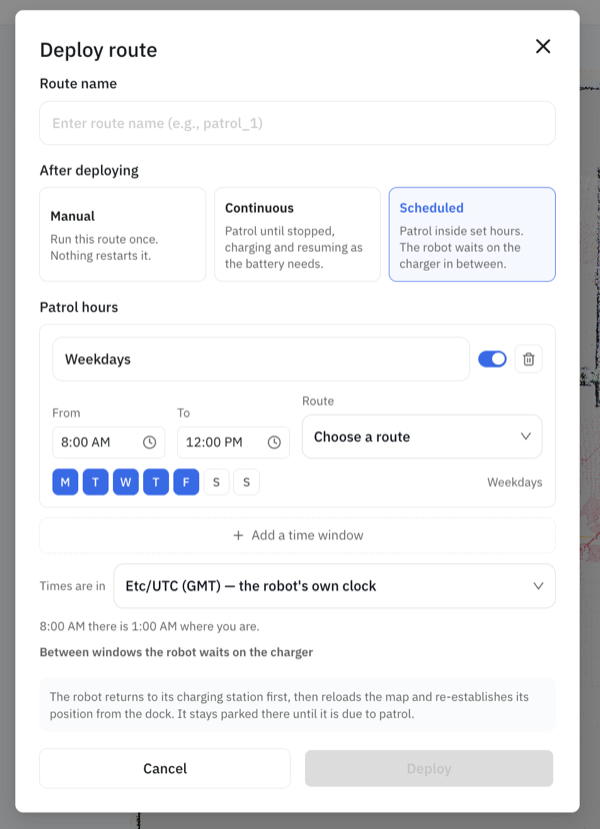 Once deployed, the schedule bar shows every configured window, the next run, and quick **Edit hours** / **Start now** / **Stop patrol** controls:
 A window can't cross midnight — for an overnight patrol, add two schedules (e.g. `22:00–23:59` and `00:00–06:00`). Overlapping windows on a shared weekday are rejected with `409`.
Manage the set:
```bash
curl http://:5000/patrol/schedules # list + next_run_at
curl -X POST http://:5000/patrol/schedules/replace ... # install a whole set atomically
curl -X POST http://:5000/patrol/schedules/delete -d '{"schedule_id": "weekday_mornings"}'
```
Use `/patrol/schedules/replace` (body `{"schedules": [...]}`) when you're editing several at once — it swaps the entire set in one step and avoids transient-overlap rejections you'd hit posting them one by one.
> **Works with auto-charging.** In `scheduled` mode, a low battery sends the robot to dock; once it's charged it rejoins the schedule — patrolling if it's still inside a window, waiting if not. The **Scheduled charge** control (see [Auto Charging](/full-autonomy-guidelines/features/auto-charging.md)) sets the level to leave the dock at before returning to the schedule.
### Deploying a patrol
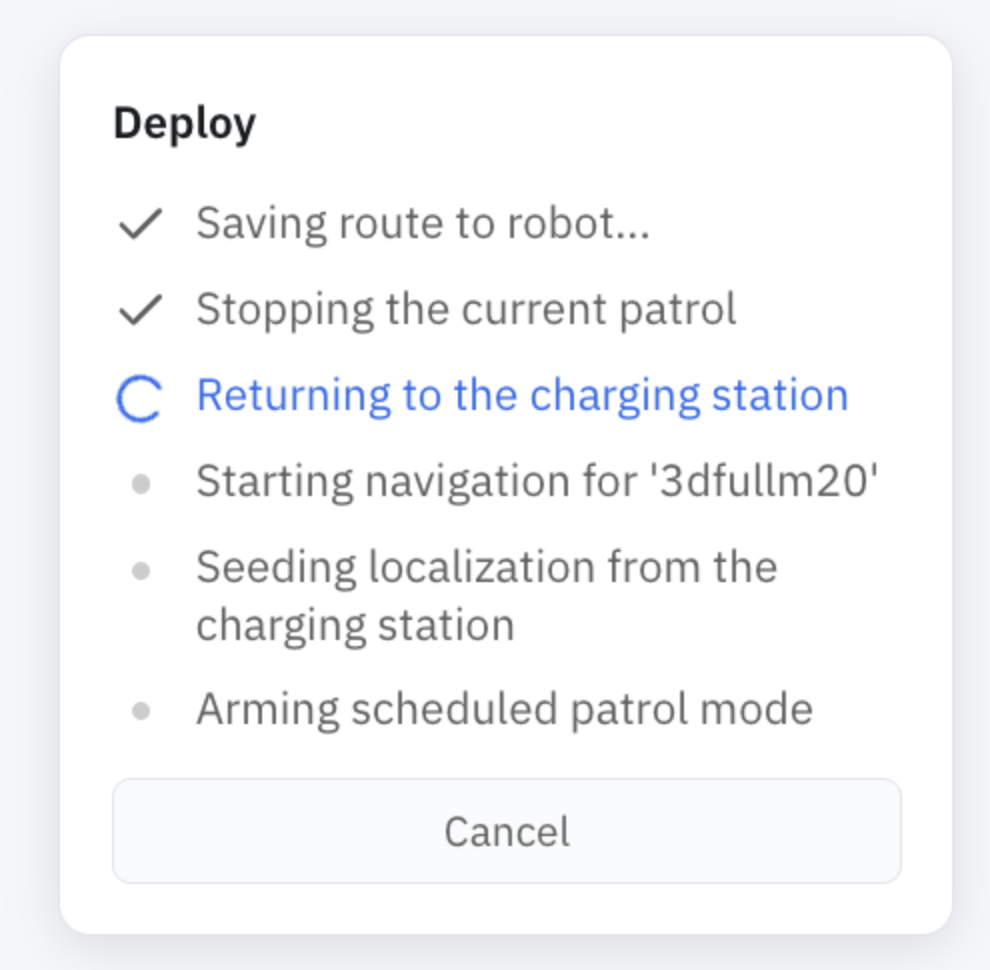
`POST /deploy` is the one-step way to put a patrol into service — it's what the portal's **Deploy** button runs. Instead of starting navigation, seeding localization, and arming the patrol by hand, one call commissions everything and parks the robot ready to go. It runs in the background and steps through:
1. Save the route to the robot
2. Stop any running patrol
3. **Return to the charging station**
4. Restart navigation on the deployed map
5. **Re-seed localization from the dock**
6. Arm the chosen mode — `manual`, `continuous`, or `scheduled`
Docking first is deliberate: restarting navigation costs the robot its pose estimate — and on the [3D stack](/full-autonomy-guidelines/features/3d-map-navigation.md) it can't recover that on its own — so it heads back to the charger, the one spot whose pose is known, and [re-seeds from there](/full-autonomy-guidelines/features/relocalization.md).
A window can't cross midnight — for an overnight patrol, add two schedules (e.g. `22:00–23:59` and `00:00–06:00`). Overlapping windows on a shared weekday are rejected with `409`.
Manage the set:
```bash
curl http://:5000/patrol/schedules # list + next_run_at
curl -X POST http://:5000/patrol/schedules/replace ... # install a whole set atomically
curl -X POST http://:5000/patrol/schedules/delete -d '{"schedule_id": "weekday_mornings"}'
```
Use `/patrol/schedules/replace` (body `{"schedules": [...]}`) when you're editing several at once — it swaps the entire set in one step and avoids transient-overlap rejections you'd hit posting them one by one.
> **Works with auto-charging.** In `scheduled` mode, a low battery sends the robot to dock; once it's charged it rejoins the schedule — patrolling if it's still inside a window, waiting if not. The **Scheduled charge** control (see [Auto Charging](/full-autonomy-guidelines/features/auto-charging.md)) sets the level to leave the dock at before returning to the schedule.
### Deploying a patrol
`POST /deploy` is the one-step way to put a patrol into service — it's what the portal's **Deploy** button runs. Instead of starting navigation, seeding localization, and arming the patrol by hand, one call commissions everything and parks the robot ready to go. It runs in the background and steps through:
1. Save the route to the robot
2. Stop any running patrol
3. **Return to the charging station**
4. Restart navigation on the deployed map
5. **Re-seed localization from the dock**
6. Arm the chosen mode — `manual`, `continuous`, or `scheduled`
Docking first is deliberate: restarting navigation costs the robot its pose estimate — and on the [3D stack](/full-autonomy-guidelines/features/3d-map-navigation.md) it can't recover that on its own — so it heads back to the charger, the one spot whose pose is known, and [re-seeds from there](/full-autonomy-guidelines/features/relocalization.md).
 ```bash
curl -X POST http://:5000/deploy \
-H 'Content-Type: application/json' \
-d '{"map_name": "office", "route_name": "patrol_route_1", "mode": "continuous"}'
# check progress, or stop it
curl http://:5000/deploy/status
curl -X POST http://:5000/deploy/cancel -H 'Content-Type: application/json' -d '{}'
```
For `scheduled` mode, include a `schedules` array in the body (same shape as [Schedules](#schedules) above).
| Parameter | Type | Required | Description |
| --------------------- | --------- | -------- | ------------------------------------------------------------------------------------------------- |
| `map_name` | string | yes | Map to commission |
| `route_name` | string | no | Route graph to load |
| `mode` | string | no | Mode to arm — `manual`, `continuous`, or `scheduled` |
| `schedules` | object\[] | no | Schedules to install when `mode` is `scheduled` |
| `use_nav3d` | bool | no | Commission on the [3D map](/full-autonomy-guidelines/features/3d-map-navigation.md) instead of 2D |
| `skip_return_to_dock` | bool | no | Skip the drive back to the charger — only when the robot is already localized |
### Parameters
`POST /start/patrol`
| Parameter | Type | Required | Description |
| ------------- | ------ | -------- | --------------------------------------------------- |
| `map_name` | string | yes | Map to patrol |
| `route_name` | string | yes | Route graph (GeoJSON) to follow |
| `launch_file` | string | no | Custom launch file (default `go2_patrol_launch.py`) |
### If something goes wrong
* **`400` starting** — the robot type doesn't support patrol, navigation isn't running, a patrol is already going, or you left out `map_name`/`route_name`.
* **`400` route missing** — save the route first with `POST /maps/route/save`.
* **`400` on pause/resume** — nothing is patrolling.
For system endpoints like `GET /status` and base control, see the [Autonomy API Overview](/full-autonomy-guidelines/api_endpoints.md).
---
# Agent Instructions
This documentation is published with GitBook. GitBook is the documentation platform designed so that both humans and AI agents can read, navigate, and reason over technical content effectively. Learn more at gitbook.com.
## Querying This Documentation
If you need additional information that is not directly available in this page, you can query the documentation dynamically by asking a question.
Perform an HTTP GET request on the current page URL with the `ask` query parameter, and the optional `goal` query parameter:
```
GET https://docs.openmind.com/full-autonomy-guidelines/features/patrol.md?ask=&goal=
```
`ask` is the immediate question: it should be specific, self-contained, and written in natural language.
`goal` is optional and describes the broader end goal you are ultimately trying to accomplish on behalf of the user. GitBook uses it to tailor the answer towards what is most useful for that goal.
The response will contain a direct answer to the question and relevant excerpts and sources from the documentation.
Use this mechanism when the answer is not explicitly present in the current page, you need clarification or additional context, or you want to retrieve related documentation sections.
```bash
curl -X POST http://:5000/deploy \
-H 'Content-Type: application/json' \
-d '{"map_name": "office", "route_name": "patrol_route_1", "mode": "continuous"}'
# check progress, or stop it
curl http://:5000/deploy/status
curl -X POST http://:5000/deploy/cancel -H 'Content-Type: application/json' -d '{}'
```
For `scheduled` mode, include a `schedules` array in the body (same shape as [Schedules](#schedules) above).
| Parameter | Type | Required | Description |
| --------------------- | --------- | -------- | ------------------------------------------------------------------------------------------------- |
| `map_name` | string | yes | Map to commission |
| `route_name` | string | no | Route graph to load |
| `mode` | string | no | Mode to arm — `manual`, `continuous`, or `scheduled` |
| `schedules` | object\[] | no | Schedules to install when `mode` is `scheduled` |
| `use_nav3d` | bool | no | Commission on the [3D map](/full-autonomy-guidelines/features/3d-map-navigation.md) instead of 2D |
| `skip_return_to_dock` | bool | no | Skip the drive back to the charger — only when the robot is already localized |
### Parameters
`POST /start/patrol`
| Parameter | Type | Required | Description |
| ------------- | ------ | -------- | --------------------------------------------------- |
| `map_name` | string | yes | Map to patrol |
| `route_name` | string | yes | Route graph (GeoJSON) to follow |
| `launch_file` | string | no | Custom launch file (default `go2_patrol_launch.py`) |
### If something goes wrong
* **`400` starting** — the robot type doesn't support patrol, navigation isn't running, a patrol is already going, or you left out `map_name`/`route_name`.
* **`400` route missing** — save the route first with `POST /maps/route/save`.
* **`400` on pause/resume** — nothing is patrolling.
For system endpoints like `GET /status` and base control, see the [Autonomy API Overview](/full-autonomy-guidelines/api_endpoints.md).
---
# Agent Instructions
This documentation is published with GitBook. GitBook is the documentation platform designed so that both humans and AI agents can read, navigate, and reason over technical content effectively. Learn more at gitbook.com.
## Querying This Documentation
If you need additional information that is not directly available in this page, you can query the documentation dynamically by asking a question.
Perform an HTTP GET request on the current page URL with the `ask` query parameter, and the optional `goal` query parameter:
```
GET https://docs.openmind.com/full-autonomy-guidelines/features/patrol.md?ask=&goal=
```
`ask` is the immediate question: it should be specific, self-contained, and written in natural language.
`goal` is optional and describes the broader end goal you are ultimately trying to accomplish on behalf of the user. GitBook uses it to tailor the answer towards what is most useful for that goal.
The response will contain a direct answer to the question and relevant excerpts and sources from the documentation.
Use this mechanism when the answer is not explicitly present in the current page, you need clarification or additional context, or you want to retrieve related documentation sections.