> For the complete documentation index, see [llms.txt](https://docs.openmind.com/llms.txt). Markdown versions of documentation pages are available by appending `.md` to page URLs; this page is available as [Markdown](https://docs.openmind.com/full-autonomy-guidelines/features/memory-sync.md).
# Memory Sync
Persist and share the agent's memory across sessions and machines via the cloud.
An agent's long-term memory — the context it builds up over time, like people it has met and past interactions — can either stay on the device or sync to the cloud. Memory Sync is the cloud path: memory is written locally *and* backed up to the cloud, so it isn't lost when the device restarts.
It's controlled by the `memory` block in the agent config:
```json5
memory: {
enabled: true,
cloud_connection: true,
}
```
`enabled` turns long-term memory on; `cloud_connection` decides where it lives. See [Configuration](/build/concepts/3_configuration.md) for where this sits in the full config.
### What it does
* **`cloud_connection: false`** — memory is kept **locally** on the device.
* **`cloud_connection: true`** — memory is written locally **and synced to the cloud**: interactions, user profiles, and daily logs are uploaded, context is retrieved from the cloud, and periodic summaries are generated there. This uses your API key.
Either way, memory persists across restarts, and it complements [face memory](/build/concepts/6_actions.md) (remembering people) and the [Knowledge Base](/build/concepts/knowledge_base.md) (retrieval over your own documents).
### Sharing across robots (Groups)
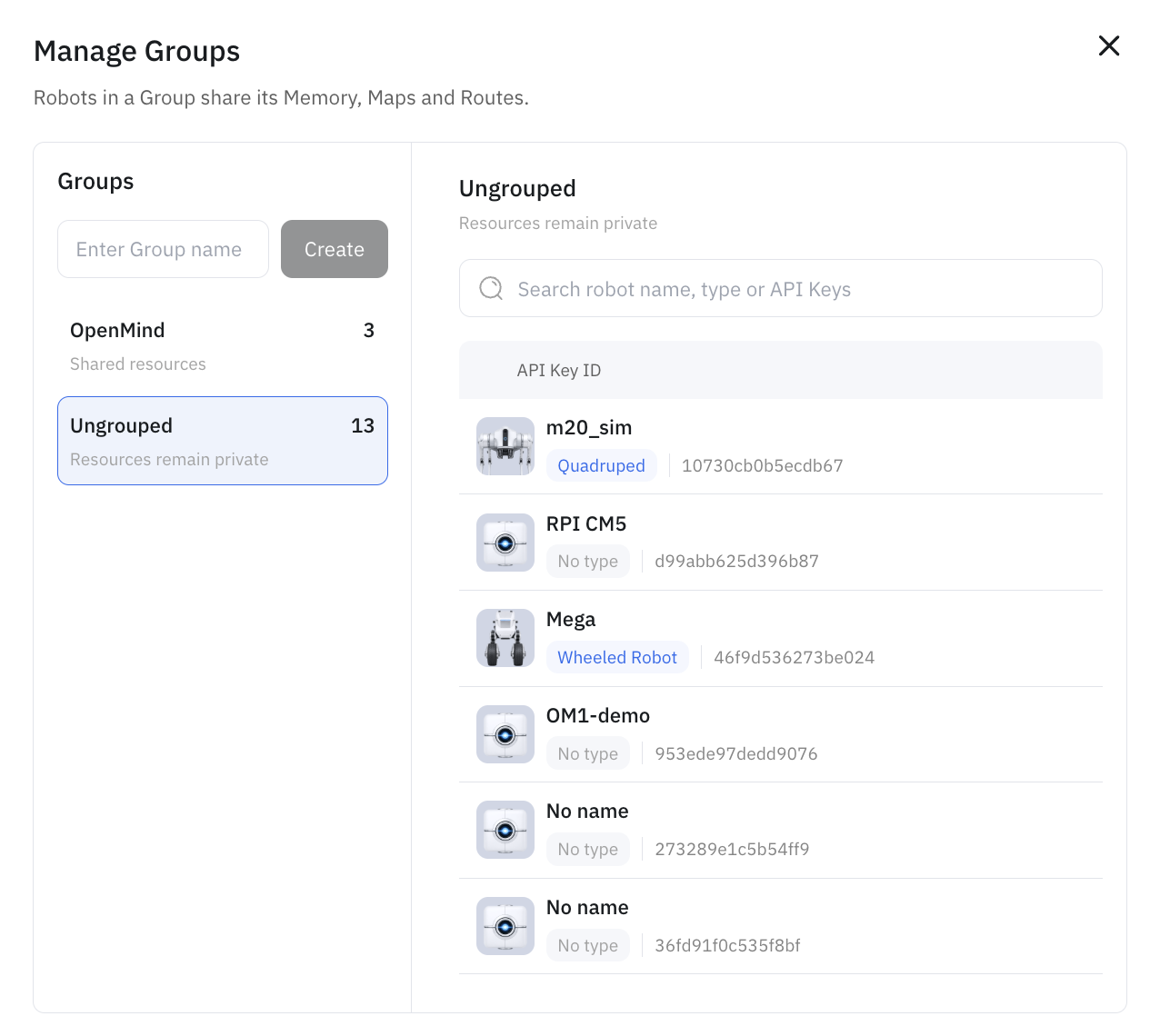
Cloud sync backs up one robot's memory; **Groups** are how you share it across a fleet. In the portal's **Manage Groups**, you create a group and add robots to it — and **robots in the same group share their Memory, Maps, and Routes**. Robots left **Ungrouped** keep their resources private.
So a person remembered, a map built, or a route drawn on one robot in a group becomes available to the others in that group.
 Cloud-synced memory is tied to your OpenMind account (via your API key); retention depends on your plan, so align with your OpenMind contact when enabling it for a deployment.
### Related
* [Configuration](/build/concepts/3_configuration.md) — the `memory` block
* [Knowledge Base (RAG)](/build/concepts/knowledge_base.md)
* [Plans & Access](/full-autonomy-guidelines/premium_features.md)
---
# Agent Instructions
This documentation is published with GitBook. GitBook is the documentation platform designed so that both humans and AI agents can read, navigate, and reason over technical content effectively. Learn more at gitbook.com.
## Querying This Documentation
If you need additional information that is not directly available in this page, you can query the documentation dynamically by asking a question.
Perform an HTTP GET request on the current page URL with the `ask` query parameter, and the optional `goal` query parameter:
```
GET https://docs.openmind.com/full-autonomy-guidelines/features/memory-sync.md?ask=&goal=
```
`ask` is the immediate question: it should be specific, self-contained, and written in natural language.
`goal` is optional and describes the broader end goal you are ultimately trying to accomplish on behalf of the user. GitBook uses it to tailor the answer towards what is most useful for that goal.
The response will contain a direct answer to the question and relevant excerpts and sources from the documentation.
Use this mechanism when the answer is not explicitly present in the current page, you need clarification or additional context, or you want to retrieve related documentation sections.
Cloud-synced memory is tied to your OpenMind account (via your API key); retention depends on your plan, so align with your OpenMind contact when enabling it for a deployment.
### Related
* [Configuration](/build/concepts/3_configuration.md) — the `memory` block
* [Knowledge Base (RAG)](/build/concepts/knowledge_base.md)
* [Plans & Access](/full-autonomy-guidelines/premium_features.md)
---
# Agent Instructions
This documentation is published with GitBook. GitBook is the documentation platform designed so that both humans and AI agents can read, navigate, and reason over technical content effectively. Learn more at gitbook.com.
## Querying This Documentation
If you need additional information that is not directly available in this page, you can query the documentation dynamically by asking a question.
Perform an HTTP GET request on the current page URL with the `ask` query parameter, and the optional `goal` query parameter:
```
GET https://docs.openmind.com/full-autonomy-guidelines/features/memory-sync.md?ask=&goal=
```
`ask` is the immediate question: it should be specific, self-contained, and written in natural language.
`goal` is optional and describes the broader end goal you are ultimately trying to accomplish on behalf of the user. GitBook uses it to tailor the answer towards what is most useful for that goal.
The response will contain a direct answer to the question and relevant excerpts and sources from the documentation.
Use this mechanism when the answer is not explicitly present in the current page, you need clarification or additional context, or you want to retrieve related documentation sections.